
 My Login
Knowledge Center: After You Order
Proof Approval – Yes, It’s Required
We cannot send any order to press without your approval of the proof. This is for your protection as well as ours. As electronic files are transferred over the internet, they can become corrupted, fonts substituted, images swapped, etc. We don’t want you to receive any surprises when you receive your final printed product, so please take the time to thoroughly inspect the proof before you give your approval. Please, don’t hesitate to contact us with any questions!
- Hard copy mock-ups and hard copy proofs will be overnighted via Next Day Air generally the same day we post your online proof.
- When your online proof is ready, we will email you a link to the proofing page. We will also try to reach you by phone. In addition to the email link, proofs can be accessed through the myPrinting for Less.
There are two versions of your proof on the proofing page:
- Proof PDF: A low-resolution version of your file at final trim size, down-sampled for shorter download times. Includes fold line indicators when appropriate. Recommended for slower connections.
- Press-Ready PDF: This is the full-resolution file which will be used to create your plates. Includes .125″ bleed margins, order number and printer’s marks which will not appear in the finished trimmed piece.
– Your text may falsely appear jagged in the full-size (zoomed out) PDF. The inability to accurately preview
vector text is a known weakness of Adobe Acrobat.
– Select the magnification tool and zoom in to the text. It should now preview clear and crisp; this is
how it will print. If it still appears jagged when zoomed in, contact us.
- Submit up to two rounds of minor corrections for us to make at no charge by using the
 button, or
 - Send us a corrected file by using the
 button.
Extensive corrections and/or design work may be subject to additional fees. Of course, there is never a charge for any corrections needed as a result of any errors we introduced in preparing your proof.
button.
Extensive corrections and/or design work may be subject to additional fees. Of course, there is never a charge for any corrections needed as a result of any errors we introduced in preparing your proof.
 button to approve your proof.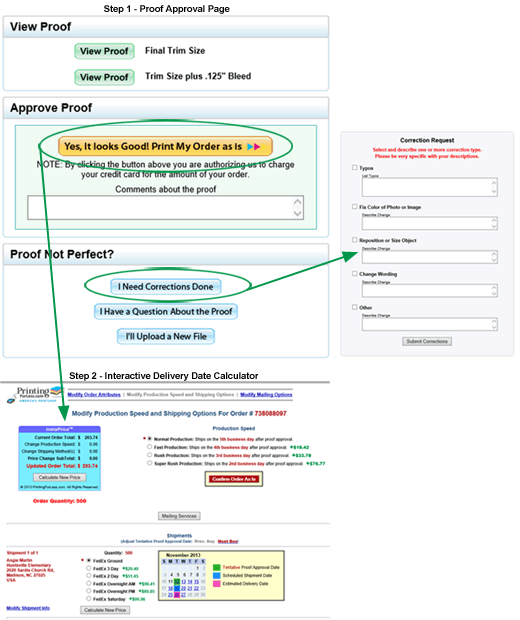
3. Complete the approval process by confirming or adjusting your production speed, shipping method and delivery addresses on the interactive delivery date calendar.
You’re in control of your order! You can:
- Speed up or slow down your production speed
- Speed up or slow down your shipping speed
- Change shipping addresses
- Add additional shipments
- Create a Mailing for all or part of your quantity
The InstaPrice® calculator will display the adjusted order total for any changes selected. Some tips:
- Experiment with various combinations of production speeds and shipping methods.
- Split your shipment if you need only a portion of your order faster.
- It is often more cost-effective to upgrade shipping rather than production.
Follow the steps to add additional addresses or modify existing addresses, and be sure to click  .
.
Changing Your Order
It’s easy to make changes to your order attributes-quantity, paper type, ink, coating and folding.
- Click on the “Change Your Order” link, found in either the upper left or right corner of your screen. You can also go directly to the Change Order Request page. Enter your 9-digit order number in the left-hand column.\
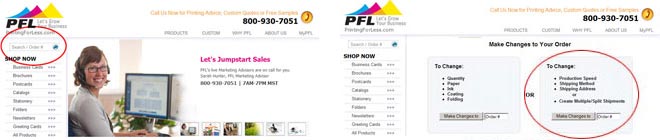
the product ordering page.
– Upgrade or downgrade paper stock
– Change your full-color or black-only ink coverages
– Add or take away coating options
– Add or take away folding options
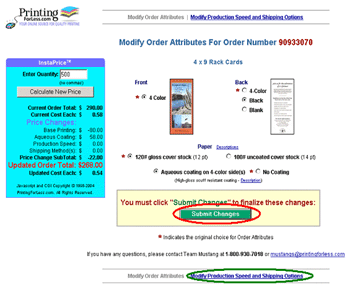
3. If you have made changes, be sure to click the button. You then have the option to view, print
or email an updated receipt.
link (circled in green) to:
- Speed up or slow down your production speed
- Speed up or slow down your shipping speed
- Change shipping addresses
- Add additional shipments
- Create a Mailing for all or part of your quantity
Tracking Your Order
You can track the status of your order at any point throughout the production process.
- Look for the box (circled below) in the upper left or right corner of your screen, or go directly to the Order Status page.

- Enter your 9-digit order number.
- The production status of your order will be displayed, as well as the estimated shipping date if you have already approved your proof. If you are able to make changes to your order-quantity, paper, production speed, shipping speed, address changes, split shipments, etc-the appropriate links will be displayed.
When your order ships, you will receive the tracking number(s) via email. The tracking information will be displayed on the online status screen as well. If you have requested that your order ships via an alternative carrier (USPS or truck freight), tracking information may not be available online. Please call 800-930-6040 with questions.

