Home Page Brochures Cards Newsletters Stationery Catalogs Folders Custom & Other Help Center
Pricing Info  |  Help Center  |  FAQ  |  Request Samples  |  About Us
PrintingForLess.com
Search Our Site


Help Center Home

Getting Started
 About Our Products
 Preparing Your Files:
   Color        Layout
   Images     Text

The Ordering Process
 Ordering Checklist
 Production Speed
 Shipping and Delivery
 Mailing Services
 Proofing
 Offers and Promotions
 Submitting Your Files
 Pricing and Payment
 After You Order:
   Approving Your Proof
   Changing Your Order
   Tracking Your Order

Graphic Design Help
 Graphic Design Tips
 Digital Photography
 Adobe Acrobat
 Adobe Illustrator
 Adobe InDesign
 Adobe Photoshop
 Microsoft Publisher
 QuarkXPress

FAQs and Glossary
 All FAQs
 General/Company
 Products/Ordering
 Mailing Services
 File Preparation
 File Transfer
 Glossary of Terms

Have a Question?
Talk to Our Experts
Call 1-800-930-6040

BBBOnLine Reliability Seal

Help Center: Color

Topics

Can't find an answer?
Call us!
800-930-6040
About RGB-CMYK
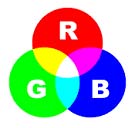
  • Scanners, digital cameras and computer monitors use red, green and blue (RGB) light to display color.

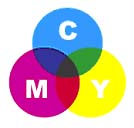
  • Presses print with cyan, magenta, yellow and black (CMYK) ink instead of RGB light, and therefore produce a different range of color.

  • To print on a four-color press, all RGB files must be converted into CMYK.

RGB lights combine to make white

CMYK inks combine to create black

  • Certain RGB colors that you can see on your monitor or camera (in particular, bright vibrant colors) simply cannot be replicated with standard CMYK inks. These unachievable RGB colors are said to be "out of the CMYK color gamut." When selecting colors for your print project, we recommend using CMYK color builds to avoid potential RGB conversion issues.
  • You are more likely to notice color shifts when you use a solid, bright color as a background or fill.

RGB Colors
(what you see on screen)

CMYK colors
(printed with ink)
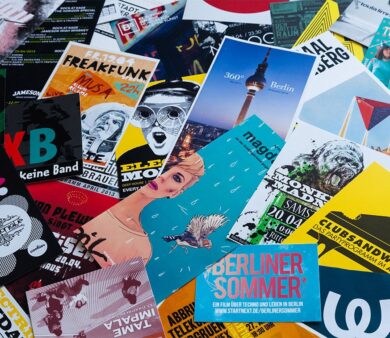
Color photographs do not suffer much from the
RGB - CMYK conversion.
  • A highly useful tool for selecting reproducible CMYK colors is the Pantone Process Color Guide. This swatch guide displays over 3,000 colors with corresponding color builds, and is available on both coated and uncoated stock. Strongly recommended if you will be doing repeat printing projects, or have color concerns.
  • We can print with PMS colors if you have a custom printing project. Contact us for a custom quote.
You can improve the color accuracy of your monitor through a process called calibration. If you have critical color concerns, consider consulting a Pantone Process Color Guide or a hard copy proof. Be aware that:
  • Monitor types vary in how well they can display color and graphics. Generally, CRT monitors have the best color and resolution; flat & LCD monitors have poorer color quality and limited resolution.
  • Individual monitor settings such as brightness, contrast, frequency, temperature, etc. will also affect your color accuracy.
  • What all this boils down to is that images on your monitor will always look somewhat different than the final printed piece.


RGB - CMYK Conversion
To be able to print on a four-color press, all RGB files must be translated into CMYK. This conversion can be easily done in most image editing programs.
  • We are happy to convert your images from RGB to CMYK, at no charge. However we will do a standard-value conversion, which may not be perfectly to your liking. We cannot be responsible for sub-par results if you furnish RGB images.
  • You will have more control over the appearance of your printed piece if you do the color conversion yourself. We want you to be happy, so please take the time to prepare your file properly. If at any time you need further help, please call us at 1-800-930-6040 for assistance.


Monitor Calibration
You can improve the color accuracy of your monitor through a process called calibration. By adjusting your monitor settings to match our press output as closely as possible, you will be able to see which colors match, which don't and how they vary. Due to inherent differences between RGB light and CMYK ink, images on your monitor will always look somewhat different than the final printed piece.

How to Calibrate Your Monitor
  1. You need a sample of something PrintingForLess.com has printed, as well as the final electronic file which was sent to press. This can be an order you have received, or if you have not ordered from us, we are happy to send you printed samples and a copy of our Design Guide.
  2. Begin the calibration process by performing the following adjustments to your monitor.
    • Brightness: Adjust the brightness setting to 50 - 60% of maximum intensity.
    • Contrast: Adjust the contrast setting to 100% of maximum intensity.
    • Monitor Color Temperature: Adjust to 5000K, 5500K or 6500K. If set at 9300K, colors will appear much brighter on monitor than they will when printed.
  3. Open the electronic file of your hard-copy printed sample. If you are using an existing order, be sure to reference the final version. Ideally, this is the Press-Ready PDF proof that you approved. If you are using our Design Guide, choose the file closest to your screen resolution.
  4. Compare the colors in the printed sample to the colors on your monitor. Make note of which colors match, which don't and how they vary.
    • Fine Adjustment: If your monitor allows for individual adjustment of red, blue and green channels, adjust your monitor to match the colors on the printed sample even more closely.
  5. We hope that this process help you become better informed about the differences between what your monitor can display and what we will produce on press.
Even a perfectly calibrated monitor has limitations. Monitors display color with light, while presses print with ink. There are some inherent differences in the visual results. Paper brightness, paper type, applied coatings and ambient light will also affect the final look of your printed piece. If you have critical color concerns, consider consulting a Pantone Process Color Guide or a hard copy proof.


FAQs

Can I order 2-color printing from you?

We suggest you get the best value for your dollar and go for full color, instead of two-color! Nonetheless, you may use any of our product pages (with the exception of postcards, business cards, presentation folders, catalogs and calendars) to order two-color printing. Simply place your order as usual, then specify in the comments section that it's a two-color job and what PMS colors you have selected. Since we are so efficient at producing high-quality four-color work, two-color pieces will be priced the same as four-color pieces. Two-color postcards, business cards, presentation folders, catalogs and calendars will generally be converted to four-color process equivalents before printing. If you need to produce 2-color business cards or postcards using spot inks, you can request a quote online

Will the colors match a sample I print out on my own printer, or a previously printed sample?

At PrintingForLess.com, part of the way we offer fast turnaround and low pricing is by printing to a "pleasing color" standard, using standard ink densities. Therefore, there is no guarantee that your finished piece will approximate your printed sample. This is due in part to the widely varying results from different output devices including inkjet and laser printers, continuous tone proofing devices, high-resolution film-based proofs, and different than true offset lithography. Even from one commercial printing firm to another, there can be significant differences in results. In particular, inkjet and laser prints are known to look substantially different than true offset lithography.
If you require precise color match, please contact us to arrange for a digital color proof. Once you approve the additional fees (starting at $40), we will produce and send you a hard proof via overnight delivery. When you approve and return the proof, we will strive to match the color of the proof when printing your final piece.
There are substantial additional charges for precise color match service. Also, if you request color correction or other changes after you see your proof, there will be a minimum of another $40+ charged for color correction time and a new proof.
Bottom line: the final product we produce for you is unlikely to match the output from your inkjet -- it will look more professional!

What is the difference between the RGB and CMYK color space and why does it matter?

RGB refers to the primary colors of light, Red, Green and Blue, that are used in monitors, television screens, digital cameras and scanners. CMYK refers to the primary colors of pigment: Cyan, Magenta, Yellow, and Black. These are the inks used on the press in "4-color process printing", commonly referred to as "full color printing".
The combination of RGB light creates white, while the combination of CMYK inks creates black. Therefore, it is physically impossible for the printing press to exactly reproduce colors as we see them on our monitors.
Many programs have the capability to convert the layout/images from the RGB color space to the CMYK color space. We request that you convert your colors from RGB to CMYK if your tools allow you to. By doing it yourself, you have maximum control over the results.You may notice a shift in color when converting from RGB to CMYK. If you do not like the appearance in CMYK, we recommend that you make adjustments while working in CMYK (usually lightening). Generally, you should specify CMYK color builds that look a little lighter than you want, since the dots of ink "fatten up" on press, giving you more pigment on paper than you see on your monitor. Be especially careful to keep backgrounds light if there is black or dark colored text over it, so that the text remains readable. See our RGB and CMYK Information page for more details.
How can I know what a particular CMYK color combination will look like?

To purchase a color guide with over 3,000 process colors with their CMYK screen percentages, please visit CreativePro here or click here to visit CDW.


Copyright © 1998-2008 PrintingForLess.com. All Rights Reserved.
Please note that PrintingForLess.com's business methods and systems functionality incorporated on this site are Patent Pending.

Microsoft and MS are registered trademarks of Microsoft Corp. which in no way endorses or is affiliated with PrintingForLess.com.
All other trademarks are the sole property of their respective owner.