• Skip to primary navigation
  • Skip to main content
  • Skip to footer
Printing for Less

Printing for Less

At Printing for Less, we've offered high quality online printing services since 1996. Shop business cards, booklets, stickers, and more!

My LoginMy Login
800-930-2423
  • Printing
    • Postcards
    • Business Cards
    • Catalogs
    • Brochures
    • Folders
    • Letters
    • Newsletters
    • Envelopes
    • Greeting Cards
    • Print Templates
    • All Products
  • Direct Mail
    • Why Direct Mail Marketing?
    • Every Door Direct Mail® Postcards
    • Direct Mail Letters
    • Catalogs & Booklets
    • Marketing Gifts & Kits
    • Direct Mail Automation
  • Services
    • Mailing Services
    • Pro Services
    • Design Services
    • Custom Printing Services
    • Reseller Program
  • Industries
    • Advertising & Design
    • Food & Beverage
    • Healthcare Payers
    • Healthcare Providers
    • Nonprofit
    • Real Estate
    • Retail
    • Technology
    • University
  • Resources
    • Direct Mail Marketing
      Resource Center
    • Printing Resource Center
    • Blogs
    • Templates
    • Video Library
    • Have a Question?
  • Request Samples
  • Get a Quote

Blog

Keep Your Type Sharp

The power of your printed piece is usually conveyed most strongly through your type. If your type is sharp, it best communicates whatever message you want to send to your audience. Here are a few tips to make sure that your type remains crisp and sharp.

First, make sure you’re using the Type tool in whatever program you’re working in. If you are sending your applications files to your printer, use the Package feature (InDesign) or Collect for Output feature (QuarkXPress) if it’s available, to send your original fonts.

Don’t inadvertently rasterize (turn into pixels) the type. This softens the type, and it loses its crispness. The stair-stepping on the left letter indicates it has been rasterized.
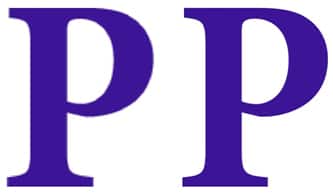
sharpened type photoshop


If want to place type you’ve created in Photoshop into a program like InDesign, save it as a Photoshop PDF file. Unlike Photoshop PSD format, this keeps the sharp edges.

If you’re creating a PDF file, be sure to embed your fonts. If you’re using an Adobe application, or using a Macintosh, this usually happens automatically. If you’re using an older version of Microsoft products, you may need to look for the option to embed fonts.

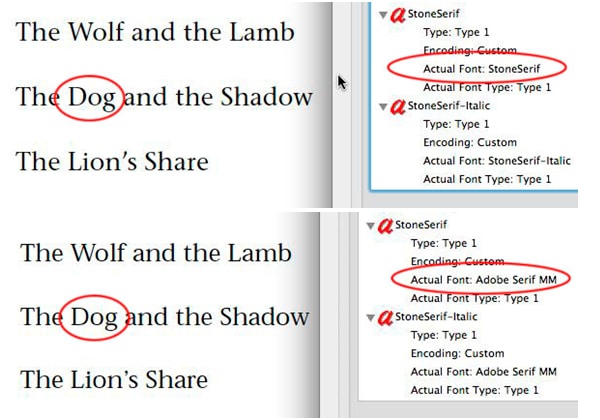
If the fonts are not embedded, they may be substituted. The original font, Stone Sans, is shown above, and the substituted font, Adobe Serif MM, is shown below.

Need help with your print? Talk to a live print expert today: 800-930-7978.
sharpened text in pdf

Unique Gatefold Brochure Design “Opens the Doors” for Success

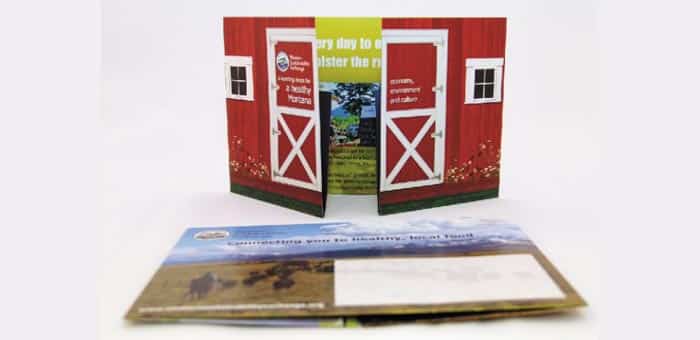
Check out the Open Gatefold Brochure Printing for Less printed for Western Sustainability Exchange.

WSE promotes a healthy local environment and profitable local economy through responsible agricultural stewardship. For their annual appeal letter, WSE chose to engage their members with a Gatefold Brochure that resembles a local Montana Barn.

Open the “barn doors” and the brochure unfolds again to reveal an ample 9” x 17” display of information. Need help with your print? Talk to a live print expert today: 800-930-7978.
gatefold brochure


Printing at the Right Size from a PDF File

A common complaint when printing from Adobe Reader or Acrobat is that the page is not the right size. Often you find that when you print your pages to your desktop printer they have gotten smaller.

This is an easy problem to solve. You just need to look closely at the choices in the Print dialog of Adobe Reader or Acrobat.

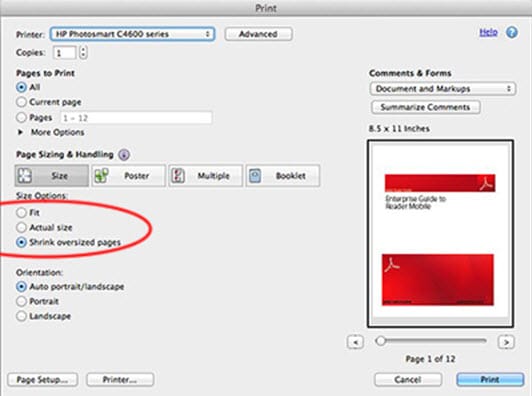
The dialog boxes will look different depending on what version of Reader or Acrobat you’re using. Here is how the Print dialog (File > Print) looks in the current version of Reader 10.1.3. Notice that it defaults to Shrink to Page. You just need to switch to Actual Size.

shrink oversized pages screenshot

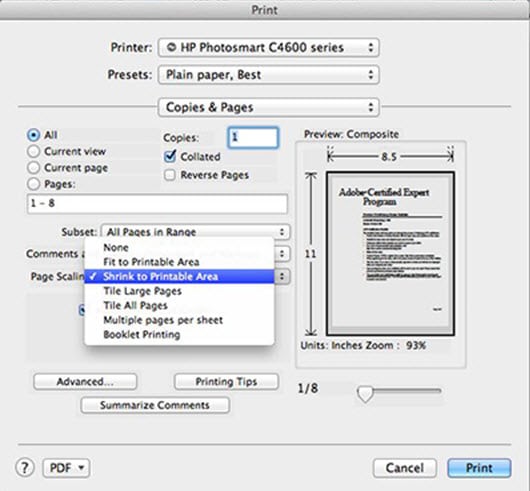
The dialog looks different in Acrobat or Reader 9. Here you need to choose None (meaning “no scaling”) if you want to print at actual size. It defaults to Shrink to Printable Area.

Need help with your printing? Talk to a live print expert today: 800-930-7978.
shrink to printable area screenshot

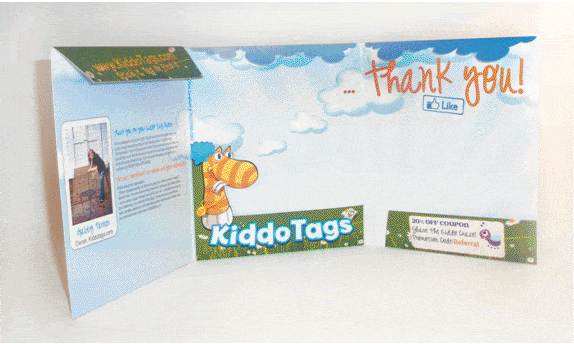
Distinctive Product Marketing Piece: Tri Fold Presentation Folder

Check out the Tri Fold Prezzo Folder Printing for Less recently printed for Kiddo Tags, a unique company that produces convenient and stylish name labels for use on children’s items.

Kiddo Tags founder Gabby Turner needed labels that would effectively mark her kid’s items at school, but also look stylish and be extremely durable.  The solution was Kiddo Tags, a uniquely customizable name tag that’s both dishwasher and microwave safe.

In marketing Kiddo Tags, Gabby wanted a piece that was as stylish as the tags themselves. The resulting Presentation Folder features a Tri Fold design, awesome Die cuts, and loads of color. Need help with your print? Talk to a live print expert today: 800-930-7978.
 

kiddo tags thank you card

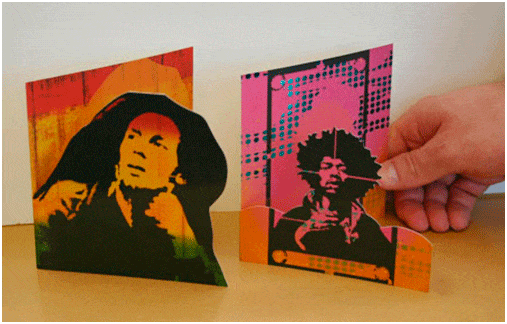
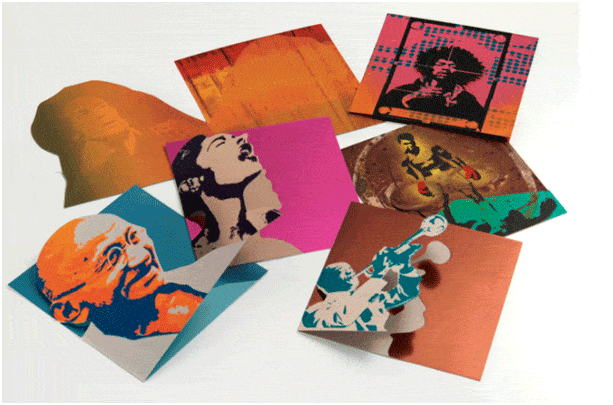
Creative Greeting Cards by Artists Hashim Thomas – stunning designs from iconic images

Check out the Die Cut Greeting Cards Printing for Less recently printed for Hashim Thomas, an accomplished artist and Creative Director of VisuaLogic, LLC.

VisuaLogic’s latest venture is a greeting card line based on Hashim’s “Icon Series” paintings. As noted on his website, Hashim “believes in sharing meaningful moments with the people he cares about, and extends this philosophy into a fitting product for that sentiment.”

Printing for Less experts went above and beyond with this project – creating six custom die and foil lines for the cards. The shape of the rock star’s hair line for example, has more detail than Printing for Less has ever created in a Die Cut before.

With a combination of modern art and historic significance, these cards bring a fresh look to your favorite cultural icons. Need help with your print? Talk to a live print expert today: 800-930-7978.
die cut cards

die cut cards with famous people

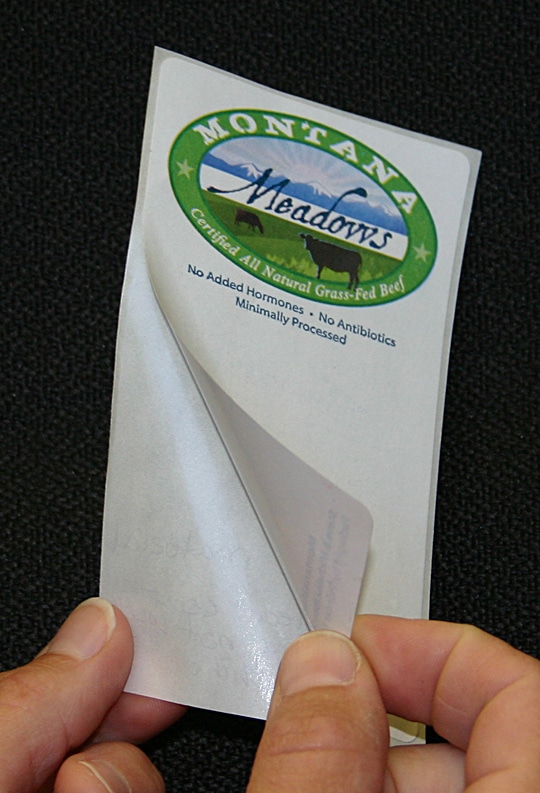
Montana Meadows – staying “stuck” even at -20° Farenheit

We take most printing for granted, especially printing (packaging, labels, etc.) that is involved with things we eat, such as a label or tag or things we use daily, such as eye drops or medicine. How do we know it is safe?
Montana Meadows, a Printing for Less customer, recently printed labels to go on their packages of certified all natural grass-fed beef. Located in Livingston, Montana, Montana Meadows has a strict process when it comes to their packaging: it needs to be food-safe and USDA approved, able to be run through a direct thermal machine for additional information such as the weight and product, and hold up to very cold temperatures, in the range of minus 20 degrees Farenheit. Now that is cold…

Additionally, Montana Meadows are members of the Western Sustainability Exchange. As their website states:
“WSE advances sound stewardship practices which create a healthy environment, culture and economy for the rural West.  Through education, the creation of economic incentives and by fostering partnerships we accomplish this mission. The shared philosophies below unite our organization. They ground us, inspire us, focus our programs and mission and guide our organizational practices.”

Do you or your company need labels like this, that meet USDA standards? If so, give us a ring at 800-930-7978, or feel free to get a quote. We can definitely help you out. Now, I wonder if they would send us some beef samples…might make for a tasty, conscious-friendly BBQ.

montana meadows sticker

  • « Go to Previous Page
  • Page 1
  • Interim pages omitted …
  • Page 39
  • Page 40
  • Page 41
  • Page 42
  • Page 43
  • Interim pages omitted …
  • Page 48
  • Go to Next Page »

Footer

Printing for Less

info@printingforless.com
100 P F L Way, Livingston, MT 59047

800-930-2423

  • Home
  • Products
  • Services
  • Industries
  • Get Printing Samples
  • Direct Mail Marketing Resource Center
  • Printing Resource Center
  • Blogs
  • Templates
  • Terms & Conditions
  • Contact
  • About Printing for Less
  • Careers
  • Login

Copyright © 1998-2026 PrintingforLess.com. All Rights Reserved.

logo
  • 800-930-2423
  • Products
  • Direct Mail Marketing
  • Services
  • Industries
  • Direct Mail Marketing Resources
  • Printing & Mailing Resources
  • Get a Quote
  • Contact Us
  • My Login
Direct Mail Delivery
This field is for validation purposes and should be left unchanged.

Get 20% Off*

Your First Print Order

Name(Required)

*By subscribing, you agree to receive weekly emails from Printing for Less. Some exclusions apply. See details.