My Login
Printing Production Speed
Production Speed or Turnaround Time Basics
“Production speed”, or “turnaround time” is how fast your order moves from proof approval to shipping. This is the time required to complete all in-house production steps— plating, printing, bindery and packaging— after you approve your proof. It does not include shipping time.
- Approve your proof before midnight MST (10pm EST; 11pm CST; 1am PST) to begin production the next business day
- On weekends, approve before 11:59pm MST on Sunday to begin turnaround on Monday
- Standard turnaround for most products is four business days; expedited turnaround, as fast as two days, is also available
- When you approve your proof, you will be given an opportunity to decide when you want to receive your order.
- You can access the interactive delivery date calendar at any time through the Change Order Request page.
- The calendar displays current shipping addresses and the scheduled shipment date & estimated delivery date, based on current production and shipping speeds
- You can upgrade/downgrade the production speed and/or shipping method in order to best meet your deadline and budget. Split your shipment if you need a portion of your order faster.
- Changing production speed after proof approval is based on individual job specifications and may or may not be available for your order-please give us a call at 800-930-6040 or email info@printingforless.com
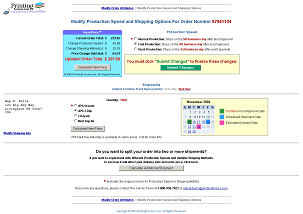
Interactive Delivery Date Calendar
Tracking Your Order
You can track the status of your order at any point throughout the production process.
- Look for the box (circled below) in the upper left corner of your screen, or go directly to the Order Status page.

- Enter your 9-digit order number.
- The production status of your order will be displayed, as well as the estimated shipping date if you have already approved your proof. If you are able to make changes to your order- quantity, paper, production speed, shipping speed, address changes, split shipments, etc- the appropriate links will be displayed.
When your order ships, you will receive the tracking number(s) via email. The tracking information will be displayed on the online status screen as well. If you have requested that your order ships via an alternative carrier (USPS or truck freight) tracking information may not be available online.
Changing Production Speed
1. Enter your 9-digit order number in the Site Search or Order Status/Change box in the left hand navigation bar.
If your order is at a status that allows changes, there will be a Change Order link. 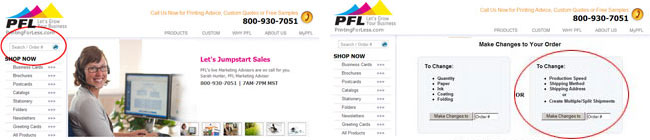
2. You are now presented with an interactive delivery date calendar. This calendar will also be automatically presented during proof approval.
- The calendar displays current shipping addresses and scheduled shipment & estimated delivery dates, based on current production and shipping speeds.
You’re in control of your order! You can:– Speed up or slow down your production speed
– Speed up or slow down your shipping speed
– Change shipping addresses
– Add additional shipments - The InstaPrice® calculator will display the adjusted order total for any changes selected. Some tips:
– Experiment with various combinations of production speeds and shipping methods
– Split your shipment if you need only a portion of your order faster
– It is often more cost-effective to upgrade shipping rather than production - Follow the steps to add additional addresses or modify existing addresses.
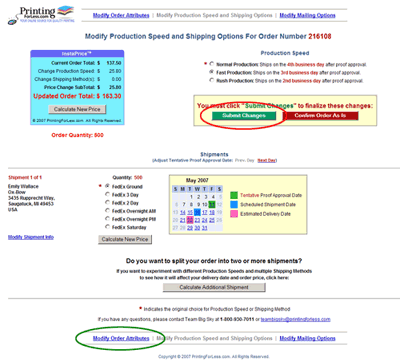
3. If you have made changes, be sure to click the  button (circled in red above). You then have the
option to view, print or email an updated receipt.
- Changing production speed after proof approval is based on individual job specifications and may or may not be available for your order.
- You will not be able to add additional shipments or modify shipping information once your job has been packaged, or is en route. Call us at 800-930-6040 with questions.
4. Click on the “Modify Order Attributes” link (circled in green above) to:
- Increase or decrease quantity
- Upgrade or downgrade paper stock
- Change your full-color or black-only ink coverages
- Add or take away coating options
- Add or take away folding options
Production Speeds by Product
|
Production Speed = Turnaround Time
Measured in Business Days after Proof Approval |
||||
| Normal | Fast | Rush | Super Rush |
|
|---|---|---|---|---|
| Banners | 3 | 2 | Call | N/A |
| Bookmarks | 4 | 3 | 2 | Call |
| Brochures | 4 | 3 | 2 | Call |
| Business Cards | 4 | 3 | 2 | Call |
| Carbonless NCR Forms | 5 | 4 | 3 | Call |
| Catalogs / Calendars | 6 | 5 | 4 | Call |
| Custom Pieces | Dependent on Piece | |||
| Door Hangers | 5 | 4 | 3 | Call |
| #10 Envelopes | 6 | Call | Call | Call |
| Booklet Envelopes | 8 | 6 | Call | Call |
| Presentation Folders | 7 | 6 | Call | Call |
| Greeting / Note Cards | 5 | 4 | 3 | Call |
| Hang Tags | 5 | 4 | 3 | Call |
| Letterhead | 4 | 3 | 2 | Call |
| Newsletters | 4 | 3 | 2 | Call |
| Notepads | 5 | 4 | 3 | Call |
| Plastic Cards | 5 | 4 | 3 | Call |
| Postcards | 4 | 3 | 2 | Call |
| Post-it® Notes | 7 | 6 | 5 | Call |
| Posters | 4 | 3 | 2 | Call |
| Rack Cards | 4 | 3 | 2 | Call |
| Table Tents | 5 | 4 | 3 | Call |
FAQs
How long does it take for me to get the proof of my job?
Once you have placed your order, you should get it within 1 business day after we receive your electronic files.
How long will it take to get my order?
Most jobs will be shipped within 4 business days after you approve your proof online. Please check the specifc product ordering page for available turnaround times. Shipping by FedEx takes from 1 to 5 business days to get to you depending on your location.
How can I get my order even faster?
Our standard service is quite fast. For most products we ship your order within 4 days after you approve your proof online, via FedEx Ground. In most parts of the country, that means you will have your order in about 6-10 days. If you want to receive your order faster, select one of our faster handling options or upgraded shipping options when you place your order.
What if I want to change something on my order after I’ve placed it or approved the proof?
We require an electronic “paper trail” for all changes made after your initial order is placed. You may make changes to such things as quantity, shipping method, or shipping address by going to the Change Order Request page. Please note that some changes cannot be made after certain stages in the production process — for instance, the quantity cannot be changed once your job has been printed.